H3VR2 meta store: Quest 3 Buying and Gameplay Guide
Learn where to buy H3VR2 on the Meta Store, what Quest headsets support it, and how its extraction shooter gameplay works.
H3VR2 meta store availability and price
The H3VR2 meta store release brings one of PC VR’s most detailed firearm sandboxes to a standalone headset. That matters because Hot Dogs, Horseshoes & Hand Grenades 2 combines realistic weapon handling, physics-heavy interactions, and an extraction roguelike structure on Meta Quest 3 hardware.
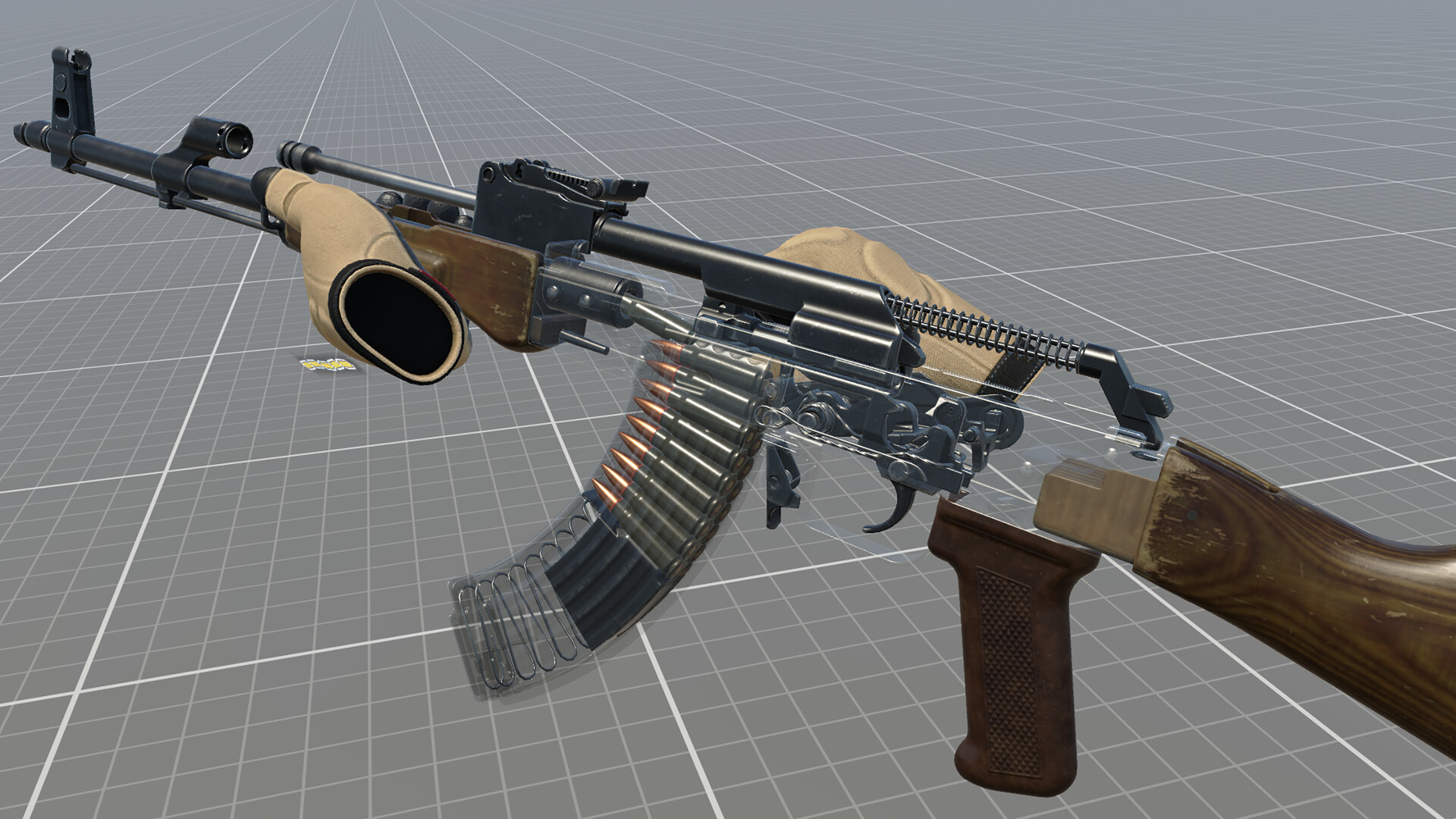
Official screenshot · Source: Steam store
The H3VR2 meta store listing is available for Meta Quest 3 and Quest 3S. The game launched on November 12, 2026, at $39.99 USD, following a $40 preorder period. It is a single-player VR shooter from RUST LTD., the studio behind the original Hot Dogs, Horseshoes & Hand Grenades.
For buyers, the key point is simple: this is not merely a target range or a collection of shooting minigames. The sequel centers on a full progression loop in which you enter the Facility, gather equipment and resources, survive hostile Sosigs, and extract valuable items for future runs.
| Detail | H3VR2 information |
|---|---|
| Official title | Hot Dogs, Horseshoes & Hand Grenades 2 |
| Common abbreviation | H3VR2 |
| Platform | Meta Quest 3 and Meta Quest 3S |
| Store price | $39.99 USD |
| Release date | November 12, 2026 |
| Developer | RUST LTD. |
| Main mode | Single-player extraction roguelike |
| Setting | The Facility |
| PC VR version | Planned for the second half of 2027, according to development updates |
| Age rating | Teen |
You can review the game’s official release information through the Meta Quest announcement for H3VR2.
Is H3VR2 worth buying on Quest 3?
The answer depends on what you want from a VR shooter. H3VR2 is a strong fit for players who enjoy mechanical depth, exploration, inventory management, and learning through experimentation. It is less suitable if you want a fast, immediately accessible multiplayer shooter with simple controls.
The original game became known for its detailed firearms and sandbox scenarios. The sequel keeps that identity but shifts the main focus toward the Facility’s extraction campaign. You are expected to inspect objects, manage ammunition, understand security systems, and decide which loot is worth carrying out.
The game also supports a more relaxed sandbox side. Players can test weapons, use Sosig spawners, practice at ranges, and create chaotic encounters without treating every session like a serious raid. However, the developers describe sandbox play as secondary to the extraction experience.
| Player type | Why H3VR2 may appeal | Possible drawback |
|---|---|---|
| VR gun enthusiast | Detailed loading, firing, safety, and weapon interactions | Requires practice and attention |
| Extraction shooter fan | Loot, upgrades, resources, and high-risk runs | Primarily single-player |
| Sandbox player | Weapons, physics experiments, ranges, and Sosigs | Sandbox is not the main progression path |
| New VR player | Strong physical interaction and guided discovery | Controls may initially feel overwhelming |
| Original H3VR fan | Familiar humor and firearm simulation | The sequel is structured differently from the original |
Quest 3 versus Quest 3S
The game is designed for both Quest 3 and Quest 3S, so owners of either headset can access the same core experience through the H3VR2 meta store listing. The Quest 3 has higher-resolution displays and pancake lenses, while the Quest 3S uses fresnel lenses and a more economical design.
That difference can affect clarity when reading maps, identifying loot, and checking weapon details. Performance compatibility, however, is not the main distinction between the two models for this game.
| Feature | Quest 3 | Quest 3S |
|---|---|---|
| H3VR2 compatibility | Yes | Yes |
| Display clarity | Higher resolution | Lower resolution |
| Lens design | Pancake | Fresnel |
| Best advantage for H3VR2 | Easier inspection of small objects and interfaces | Lower entry price |
| Recommended for | Players prioritizing visual clarity | Players seeking compatible standalone VR |
How the Facility extraction loop works
The main campaign places you inside the Facility, a strange megastructure populated by hostile and sometimes oblivious hot-dog enemies called Sosigs. Your goal is to explore, collect useful items, complete objectives, and reach an extraction point before your supplies or health run out.
Runs are built around risk management. You can carry only a limited amount of equipment, and not every item has the same value. Some objects are useful for crafting or upgrades, while others can be sold, recycled, or stored for later use.
The official progression design emphasizes two broad rewards: blueprints and upgrades. Blueprints unlock additional items, while upgrades improve your economy, carrying capacity, and other long-term systems.
| Run stage | What to do | Practical priority |
|---|---|---|
| Prepare | Choose a loadout and check ammunition | Bring only essential equipment |
| Enter | Move into the Facility and learn the route | Observe before engaging |
| Search | Scan and collect loot, chips, currency, and supplies | Favor useful items over clutter |
| Survive | Manage Sosigs, alarms, gates, and health | Avoid unnecessary fights |
| Extract | Deposit valuable items at a valid extraction point | Leave before your inventory becomes a liability |
| Upgrade | Recycle, store, or use recovered resources | Improve capacity and future loadouts |
A community gameplay video provides a useful example of the learning curve. The player initially struggled with basic tasks such as loading a pistol, identifying equipment, understanding security gates, and finding the extraction route. After several attempts, they completed a successful run, unlocked new equipment, and discovered a vendor.
That is player experience, not an official tutorial. Still, it illustrates an important design principle: H3VR2 expects you to learn by handling objects rather than relying on a traditional menu-driven interface.
Weapons, physics, and interaction depth
The biggest reason to consider the H3VR2 meta store version is its approach to firearm simulation. Weapons are not simply animated tools that fire when you pull a trigger. You must interact with magazines, safeties, ammunition, charging mechanisms, attachments, and other physical components.
The developers have described an interaction system built around carefully sequenced hand poses and a ballistics model designed for a high level of detail. Firearm sounds, mechanical movement, handling, and ammunition behavior all contribute to the simulation.
That depth creates a satisfying sense of ownership over each weapon, but it also means mistakes are common. A gun may not fire because the safety is engaged, the magazine is missing, the chamber is empty, or the weapon was handled incorrectly.
| Weapon-handling check | Why it matters |
|---|---|
| Confirm a magazine is inserted | A weapon cannot fire without the required ammunition supply |
| Check the chamber | A loaded magazine does not always mean a round is chambered |
| Inspect the safety | The trigger may work correctly while the weapon remains safe |
| Carry spare magazines | Reloads take time during a firefight |
| Learn attachment points | Not every accessory fits every weapon |
| Practice before a raid | Familiarity reduces panic and wasted ammunition |
This approach is especially effective in VR because your hands become the interface. Instead of selecting “reload” from a button prompt, you physically reach for the magazine, position it, and operate the weapon. The result can feel remarkably convincing, although players who prefer simplified controls may need time to adjust.
Beginner tips for H3VR2 on Meta Quest
Your first few Facility runs should be treated as training missions rather than attempts to maximize profit. The game gives you a lot to inspect, and rushing into combat can drain health and ammunition before you understand the area.
1. Start with storage space
A loadout with additional storage can be more valuable than a slightly stronger weapon during early runs. More carrying capacity gives you room to experiment with loot and reduces the chance that you must abandon useful items.
2. Load your weapon before entering danger
Before leaving the starting area, confirm the magazine, chamber, safety, and spare ammunition. Physically practice the reload process while there is no enemy pressure.
3. Use the scanner frequently
Unknown objects may be currency, crafting resources, equipment, security tools, or weapons. Scan unfamiliar items instead of filling your inventory with objects that may have little value.
4. Do not fight everything
Sosigs can attract attention and consume supplies. If an enemy is not blocking your route or protecting valuable loot, bypassing the encounter may be the better decision.
5. Learn security rules
The Facility uses gates and security systems that can react to unauthorized items. A firearm with a removable magazine may trigger a high-security weapon gate, so pay attention to signs and warnings before crossing.
6. Carry healing items
A small mistake can become a failed extraction when you have no way to recover health. Keep at least one healing item available if your inventory permits it.
| Early mistake | Better approach |
|---|---|
| Entering with an unloaded pistol | Perform a complete weapon check before moving |
| Taking every object | Scan first and prioritize valuable or useful loot |
| Shooting neutral characters immediately | Observe behavior and avoid unnecessary alarms |
| Carrying too many magazines | Keep a practical reserve and recycle extras later |
| Ignoring the map | Check routes, extraction points, and nearby facilities |
| Waiting too long to extract | Leave once you have meaningful rewards |
7. Extract before greed takes over
The most valuable loot is worthless if you fail to bring it back. Once you have a blueprint, key resource, useful attachment, or substantial currency, consider ending the run rather than pushing deeper without a clear plan.
Progression, storage, and long-term goals
The extraction system gives each run a purpose beyond defeating enemies. Recovered materials can support upgrades, improve your economy, increase resource capacity, or unlock additional equipment. The developers have also discussed future cosmetic customization for the home base.
Blueprints are tied to special in-game items called CHIPS. These can be obtained from Item Spawners, but taking them may provoke a security response. That creates an interesting risk-reward choice: a blueprint can improve future runs, but obtaining it may immediately make the current run more dangerous.
| Reward type | Likely use | Best early-game attitude |
|---|---|---|
| Blueprint or CHIP | Unlocks future items | Prioritize if the route is safe |
| Facility currency | Purchases and economy | Keep it if extraction is close |
| Crafting resources | Upgrades and production | Store or recycle strategically |
| Attachments | Improve weapon options | Keep versatile pieces |
| Ammunition | Supports future raids | Avoid carrying more than needed |
| Healing supplies | Extends run survival | Keep at least one when possible |
| Maps and security tools | Improve navigation and access | Valuable for learning the Facility |
The H3VR2 meta store release is particularly appealing for players who like gradual mastery. You are not only improving your character or inventory; you are improving your own ability to identify objects, manipulate weapons, read the environment, and plan an escape.
Future updates and platform outlook
RUST LTD. has outlined an ongoing content plan for H3VR2. Planned additions include more firearms, new Facility biomes, expanded Challenge and Certification ranges, and potential licensed collaborations. Development updates have also mentioned regular content additions rather than battle passes or limited-time monetization systems.
The initial Facility experience is expected to expand over time, with environmental storytelling gradually revealing more about the setting and the player’s situation. A PC VR release is planned for the second half of 2027, while the current standalone version is focused on Quest 3 and Quest 3S.
| Planned direction | What it could add |
|---|---|
| New Facility biomes | More environments, routes, and challenges |
| Additional firearms | Broader historical and modern weapon selection |
| Challenge expansions | More focused skill tests |
| Certification range updates | Structured practice and mastery goals |
| Licensed collaborations | Weapons or content inspired by outside properties |
| Story development | More clues about the Facility and its catastrophe |
| PC VR version | A later release for Steam VR players |
Because these details concern future development, treat them as announced plans rather than guaranteed features available at launch. The current H3VR2 meta store version should be judged by its existing extraction campaign, weapon simulation, and sandbox tools.
Final verdict: should you buy H3VR2?
Buy H3VR2 on Quest 3 or Quest 3S if you want a technically ambitious single-player VR shooter that rewards patience. Its strongest features are the tactile weapons, detailed physics, exploration, extraction tension, and unusual combination of serious simulation with absurd hot-dog humor.
It may not be the right choice if you want multiplayer, a short linear campaign, or instant arcade-style action. The controls can be demanding, and the first few runs may involve more confusion than triumph.
For players willing to learn, however, the H3VR2 meta store version offers a distinctive Quest experience. The game turns basic actions—loading a magazine, scanning an object, opening a gate, checking a map, and sorting loot—into meaningful parts of the gameplay loop.
Frequently asked questions
Is H3VR2 available on the Meta Store?
Yes. The H3VR2 meta store release is available for Meta Quest 3 and Quest 3S. It launched on November 12, 2026, for $39.99 USD.
Can Quest 2 run H3VR2?
The confirmed standalone launch platforms are Meta Quest 3 and Quest 3S. Quest 2 is not listed among the supported headsets, so owners should not assume compatibility.
Is H3VR2 multiplayer?
The main Facility experience is designed as a single-player extraction roguelike. The game also includes sandbox-style activities, but the available information does not identify a multiplayer campaign.
Is H3VR2 different from the original H3VR?
Yes. The original Hot Dogs, Horseshoes & Hand Grenades is best known as a large PC VR firearm sandbox. H3VR2 brings the series to standalone Quest hardware and places a stronger emphasis on extraction gameplay, loot, progression, and the Facility campaign.
Related Guides
H3VR2 pc: Release Date, Setup, and Performance Guide
Find out when H3VR2 comes to PC, how players run it early, expected features, performance tips, and what to know before buying.
H3VR2 psvr2: Platforms, Release News, and Alternatives
Is H3VR2 coming to PSVR2? Explore confirmed platforms, release news, gameplay features, and the best alternatives for PlayStation VR2 owners.
H3VR2 quest 2: Compatibility, Platforms, and Options
Is H3VR2 available on Quest 2? Learn which Meta Quest headsets support the game, why Quest 3 is required, and what alternatives players have.
H3VR2 early access: Quest Launch Guide and Review
Everything you need to know about H3VR2 early access, including Quest availability, Facility mode, gunplay, pricing, tips, and PC VR plans.
H3VR2 coop: What Multiplayer Players Need to Know
Wondering about H3VR2 coop? Here is what is confirmed, what remains unknown, and how the extraction mode could shape future multiplayer.