H3VR2 gameplay: Complete Beginner’s Guide
Explore H3VR2 gameplay, training certifications, weapons, movement, Facility mode, and practical beginner tips for Quest 3.
H3VR2 gameplay overview: What makes it different?
H3VR2 gameplay combines a hands-on VR shooting range with an extraction-style campaign, making weapon knowledge and physical interaction just as important as aim. For new players, H3VR2 gameplay matters because the sequel is designed to be more approachable while preserving the detailed firearm handling that defines the series.
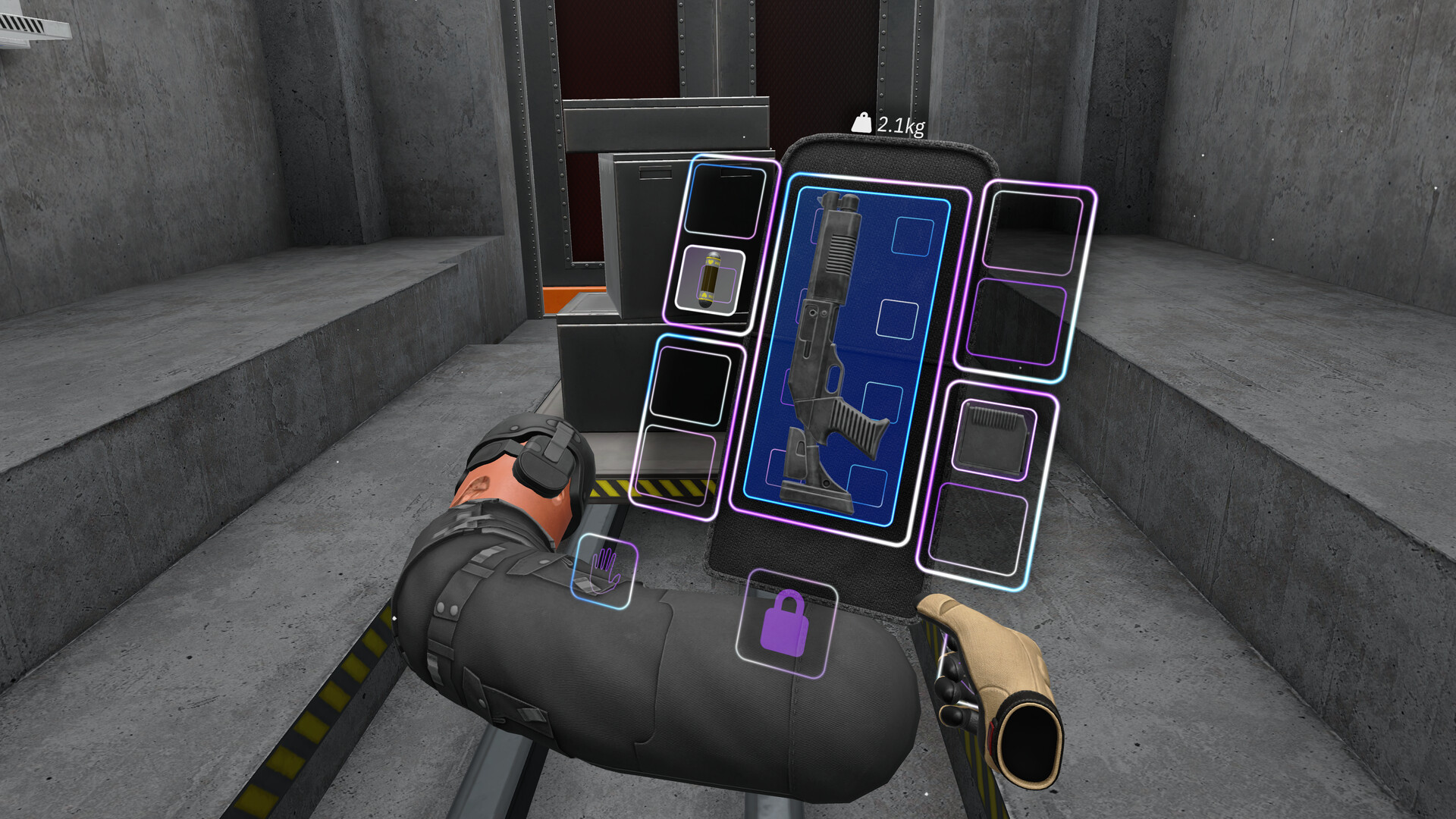
Official screenshot · Source: Steam store
Hot Dogs, Horseshoes & Hand Grenades 2 launched on Meta Quest 3 on November 12, 2026, according to UploadVR’s release report. A PC VR version is planned for the second half of 2027, with enhanced graphics, broad hardware support, and a dedicated modding framework.
The available player experience video shows a newcomer working through the game’s certification range before entering the Facility. That progression offers a useful preview of the onboarding process: learn the controls, practice basic interactions, handle different firearm types, and then apply those skills against hostile enemies.
| H3VR2 feature | What it means for players |
|---|---|
| Certification range | Guided lessons for controls, movement, throwing, grenades, and firearms |
| Facility mode | Procedurally generated extraction-style campaign |
| Multiple movement options | Teleport and smooth movement are supported |
| Detailed weapons | Guns use different loading, cycling, and firing procedures |
| Quest 3 launch | The game is currently available on Meta’s standalone headset |
| Planned PC VR release | Steam version is expected during the second half of 2027 |
The sequel is also planned as a “pseudo-live service,” with new biomes reportedly targeted at a rate of two per year. Additional modes, sandbox packs, and licensed content are expected to arrive as paid DLC. That structure gives H3VR2 gameplay a longer-term focus beyond the initial campaign.
Start with the certification range
The certification range is the best place to begin, even if you already play other VR shooters. H3VR2 asks you to use your hands, controllers, and weapons in ways that are more physical than a typical point-and-shoot game.
The opening lessons introduce the hub, controller inputs, grabbing, distance grabbing, throwing, shooting, and teleport movement. The instructions are intentionally methodical, but completing them will save time once you enter the Facility.
| Certification | Core skill | Beginner takeaway |
|---|---|---|
| Controllers and hands | Hand placement and grip inputs | Confirm both controllers are tracking correctly |
| Grabbing and holding | Picking up, rotating, and dropping objects | Use trigger or grip inputs depending on the object |
| Distance grabbing | Pulling distant items toward you | Hold the highlighted button while aiming the laser |
| Throwing | Overhand and underhand throws | Use controlled movements rather than exaggerated swings |
| Shooting | Pointing and firing a basic firearm | Simple guns contain a single round |
| Teleport movement | Moving between stations | Practice positioning before entering combat |
| Grenades | Pulling pins and throwing explosives | Keep the pin controlled until you are ready |
| Firearms | Loading and cycling multiple weapon types | Every action has a specific physical procedure |
A useful early habit is to identify which hand is your firing hand and which hand is your support hand. The lessons repeatedly use this distinction. Your firing hand generally controls the weapon’s main grip, while the other hand handles ammunition, slides, bolts, charging handles, or spent casings.
The throwing lesson also highlights a practical VR issue: tracking can become less reliable when your hands move near your hips or outside the headset’s preferred tracking area. If a throw feels inconsistent, try a shorter, more controlled motion and keep your hand within view of the headset.
H3VR2 weapons and reloading explained
Weapon handling is central to H3VR2 gameplay. The certification range includes firearms with different operating systems, so success depends on recognizing the mechanism rather than relying on one universal reload button.
The following table summarizes the weapon lessons shown in the player experience video.
| Weapon type | Main action practiced | What to remember |
|---|---|---|
| Break-action shotgun | Open the breach, load, close, and cock | Remove the spent shell before reloading |
| Derringer | Open the breach and refill chambers | The breach must be opened before another shot |
| Rolling-block firearm | Open the action and load a round | Learn the timing of the block and casing ejection |
| Trapdoor rifle | Operate the latch and close the breach | Confirm the action is fully closed before firing |
| Falling-block rifle | Use the underside lever | Keep both hands on the rifle during the opening motion |
| Pump-action shotgun | Rack the forward handle | Move it completely backward and forward |
| Bolt-action rifle | Insert a magazine and cycle the bolt | A follow-up shot requires bolt manipulation |
| Semi-automatic pistol | Insert a magazine and operate the action | Practice a complete reload sequence |
| Open-bolt firearm | Select a firing mode and cycle the bolt | Check the selector before attempting to fire |
| Closed-bolt firearm | Load, cycle, and switch firing modes | Automatic fire changes ammunition management |
A simple reload workflow
When learning a new gun, follow the same four-step process:
- Identify the action. Look for a breach, bolt, pump, slide, magazine well, or charging handle.
- Locate ammunition. Determine whether the weapon uses loose rounds, a magazine, or a combination of both.
- Perform one slow reload. Do not rush the first attempt. Watch where the spent casing goes and which hand controls each part.
- Repeat under light pressure. Fire one round, reload, and fire again before taking the weapon into a difficult encounter.
This approach is more reliable than memorizing button combinations because H3VR2 simulates the physical logic of each firearm. A pump shotgun requires a pump action after firing, while a bolt-action rifle needs the bolt cycled. A break-action weapon must be opened before you can remove the casing and insert a fresh round.
For your first Facility run, choose a weapon with a reload process you can perform confidently. A familiar semi-automatic pistol may be more useful than a powerful rifle you cannot cycle quickly.
Facility mode and the extraction loop
The primary campaign mode is called Facility. According to the available game information, it is an extraction-style experience set inside a procedurally generated megastructure. Players fight enemies, search for resources, and attempt to make progress through changing environments.
That makes H3VR2 gameplay less predictable than a static shooting gallery. You are not only trying to hit targets; you are also managing ammunition, positioning, equipment, and the risk of moving deeper into an unfamiliar area.
| Extraction priority | Why it matters | Practical approach |
|---|---|---|
| Secure a reliable weapon | Improvised equipment may be difficult to reload | Favor guns you handled during certification |
| Conserve ammunition | Missed shots can limit future options | Fire deliberately and avoid wasting rounds |
| Learn the environment | Procedural layouts reduce memorization | Use landmarks and note safe routes |
| Manage your inventory | Resources may compete for limited space | Keep essential ammunition and tools accessible |
| Control engagement distance | Different weapons excel at different ranges | Use cover and avoid unnecessary close fights |
| Plan an exit | Progress is valuable only if you can survive | Do not push deeper without a clear retreat |
The player experience footage suggests a comedic, chaotic tone alongside the tactical shooting. Enemy voice lines and exaggerated reactions help keep the game from feeling overly grim. Still, the underlying systems reward calm decision-making.
A good first-run strategy is to treat the Facility as a scouting mission. Do not rush toward every sound or fight. Move slowly, check corners, identify useful resources, and learn how enemies approach. The first few runs can teach you more about navigation and equipment than about raw accuracy.
How to prepare for a Facility run
Before leaving the hub, confirm the following:
- You can teleport or move smoothly without losing orientation.
- You know how to reload your primary weapon.
- You can identify your remaining ammunition.
- You understand how to drop or stow unwanted items.
- You can throw a grenade without losing control of it.
- You have a fallback weapon or alternate plan.
- Your play space is clear of furniture and obstacles.
Room-scale awareness is especially important in a game that encourages physical interaction. A wider swing, emergency reload, or hurried turn can bring your real-world surroundings into the action.
H3VR2 gameplay tips for new players
The best H3VR2 gameplay tips are practical rather than flashy. You will improve faster by developing consistent habits than by trying to master every weapon immediately.
1. Finish the lessons in order
The certification range gradually builds from basic hand interactions to complex firearms. Skipping the early grabbing and throwing lessons can make later weapon handling feel confusing. Complete the range at least once before judging the controls.
2. Use controlled movements
VR tracking is not perfect, particularly when your hands are low or outside the headset’s view. Short, deliberate motions are often more dependable than dramatic movements. This applies to throwing, racking a pump, manipulating a bolt, and reaching for equipment.
3. Practice one weapon family at a time
Rather than sampling every firearm, choose one weapon from each broad category:
- One simple pistol
- One semi-automatic pistol
- One pump shotgun
- One bolt-action rifle
- One grenade type
This gives you a manageable toolkit while exposing you to different reload systems.
4. Keep your support hand active
Many weapons require both hands. Your support hand may open a breach, insert ammunition, operate a pump, pull a charging handle, or remove a spent casing. Keep it ready instead of leaving it idle at your side.
5. Reload before you are empty
Reloading behind cover is safer than reloading in the middle of a fight. After an encounter, check your ammunition and top off when possible. The exact process depends on the firearm, so build the habit during certification.
6. Learn movement before combat
Teleport movement can help new VR players avoid motion sickness and reposition precisely. Smooth movement may feel more natural for experienced players, but it can make orientation harder during a stressful firefight. Test both modes in the range.
| Player profile | Recommended movement starting point | Why |
|---|---|---|
| New to VR | Teleport movement | Easier orientation and less motion discomfort |
| Comfortable with VR | Smooth movement at a moderate speed | More fluid repositioning |
| Motion-sensitive player | Teleport with gradual turning | Reduces continuous visual motion |
| Competitive or experienced player | Try both and compare | Choose based on combat control and comfort |
7. Treat grenades as tools, not panic buttons
The certification range introduces timed grenades and impact grenades. Their behavior differs, so practice each type before using one in a confined space. Pulling a pin is only the beginning; you also need to control the throw and understand when the explosive activates.
Release status and what comes next
H3VR2 is currently positioned as a Quest 3 VR shooter, with the PC VR edition planned for the second half of 2027. UploadVR reports that the PC version will include enhanced graphics, comprehensive hardware support, and a dedicated modding framework.
| Platform | Status | Notable information |
|---|---|---|
| Meta Quest 3 | Released November 12, 2026 | Standalone version with Facility and other gameplay modes |
| PC VR / Steam | Planned for the second half of 2027 | Enhanced graphics and dedicated modding support |
| Future content | Planned | New biomes, sandbox packs, modes, and licensed content |
Because the game is designed around additional content, the long-term experience may change substantially after launch. New biomes could affect navigation and combat, while sandbox packs may appeal to players who prefer experimentation over extraction runs.
For the latest platform information and launch details, read the UploadVR report on the H3VR2 Quest 3 release. The hands-on details discussed above come from a player experience video, so specific impressions should be treated as community reports rather than a complete technical review.
FAQ about H3VR2 gameplay
What is H3VR2 gameplay like?
H3VR2 gameplay combines detailed VR firearm handling, a training range, multiple movement options, and an extraction-style campaign called Facility. Players fight enemies, gather resources, and navigate procedurally generated environments.
Is H3VR2 difficult for beginners?
It can be demanding at first because weapons use different physical loading and cycling procedures. The certification range makes the learning curve more manageable. New players should complete the basic lessons and practice one or two reliable weapons before entering Facility.
Can I use teleport movement in H3VR2?
Yes. The game supports both teleport movement and smooth movement. Teleporting is a strong starting option for players new to VR or those who experience motion discomfort.
What weapons should beginners use?
Start with a weapon you can reload consistently, such as a basic pistol or a semi-automatic pistol. After that, practice a pump-action shotgun or bolt-action rifle. Familiarity and reliability are more valuable than choosing the most powerful firearm.
When is the PC VR version coming?
The PC VR version is planned for the second half of 2027. It is expected to offer enhanced graphics, broad hardware verification, and a dedicated modding framework.
Related Guides
H3VR2 featurette: What the Hands Update Reveals
Explore what the H3VR2 featurette reveals about hand posing, object interaction, inventory, and the sequel’s VR design direction.
H3VR2 logo: How to Find Official Art and Use It
Looking for the H3VR2 logo? Learn how to verify official artwork, find reliable sources, and avoid confusing fan-made graphics with game branding.
H3VR2 review: Is This the Ultimate Quest Shooter?
Our H3VR2 review examines gunplay, extraction gameplay, performance, inventory systems, difficulty, and whether this Quest shooter is worth buying.
H3VR2 announcement: New Guns and Extraction Gameplay
The H3VR2 announcement reveals a new VR shooting adventure with procedural missions, extraction gameplay, deeper gun handling, and more.
H3VR2 meta store: Quest 3 Buying and Gameplay Guide
Learn where to buy H3VR2 on the Meta Store, what Quest headsets support it, and how its extraction shooter gameplay works.