H3VR2 sandbox: Modes, Tips, and What to Expect
Explore the H3VR2 sandbox, Facility mode, weapons, onboarding, platform plans, and practical tips for getting started in this VR shooter.
Why the H3VR2 sandbox matters
The H3VR2 sandbox is more than a shooting range: it is the game’s most flexible way to experiment with virtual firearms, physics, movement, and challenge setups. That matters because Hot Dogs, Horseshoes & Hand Grenades 2 is designed in the spirit of a simulation, and learning its weapons can be intimidating without pressure-free practice.
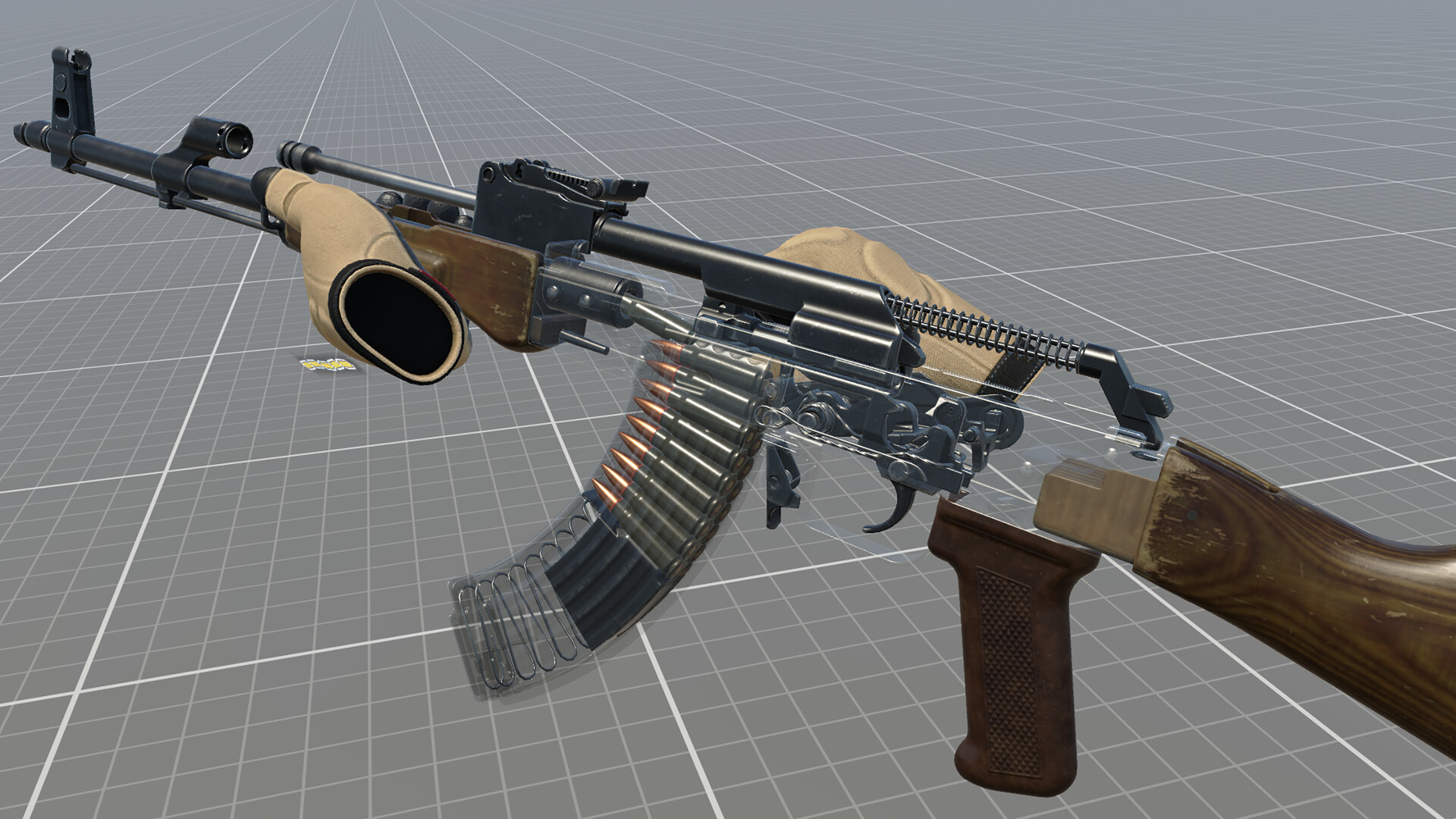
Official screenshot · Source: Steam store
For new players, the H3VR2 sandbox provides a useful alternative to jumping directly into the extraction campaign. For experienced VR shooter fans, it offers room to test reloads, handling techniques, weapon combinations, and the game’s detailed hand interactions before entering a procedurally generated mission.
The sequel launched on Quest 3 on November 12, 2026. A PC VR version is planned for the second half of 2027, with enhanced graphics, broader hardware support, and a dedicated modding framework. For now, Quest 3 players are the first to explore the game’s core modes.
Quick take: Start with the tutorials and Certification Range, then use the H3VR2 sandbox to build confidence before attempting Facility mode.
What can you do in the H3VR2 sandbox?
The sandbox is intended to let players experiment at their own pace. While the available content may expand through updates and paid sandbox packs, the current appeal is the freedom to handle weapons without the resource pressure of an extraction run.
A player-experience review described the gunplay as exceptionally smooth, with physics-based firearms and highly interactive hands. The same review noted that the realism can make the game difficult for beginners. That combination makes the sandbox especially important: it gives you time to understand the controls before enemies and objectives compete for your attention.
| Sandbox activity | Why it helps | Best for |
|---|---|---|
| Weapon handling practice | Learn how firearms behave in VR | New players |
| Reload drills | Build muscle memory for magazines, bolts, and chambers | All players |
| Movement testing | Adjust locomotion and comfort options | VR newcomers |
| Target practice | Improve accuracy without mission pressure | Competitive players |
| Equipment experiments | Compare tools and weapon combinations | Returning H3VR fans |
| Challenge preparation | Test a strategy before using it in a run | Facility players |
The main benefit is control over the pace. You can stop, inspect an unfamiliar firearm, repeat a reload, or switch equipment without worrying that an enemy will interrupt you. That makes the H3VR2 sandbox a practical training area rather than a disposable side mode.
Use the sandbox as a training loop
A useful practice routine takes only 10 to 15 minutes:
- Pick one primary weapon and one backup.
- Practice drawing each weapon from its storage position.
- Fire a short group at a target.
- Perform an empty reload without looking away from the target.
- Repeat the drill while moving.
- Finish by testing your preferred locomotion and comfort settings.
This approach is more effective than trying every weapon immediately. Mastering one platform first helps you recognize the game’s interaction patterns, including how hands grip, manipulate, and stabilize equipment.
H3VR2 modes compared
The H3VR2 sandbox is only one part of the sequel. The headline mode is Facility, an extraction-style campaign set inside a procedurally generated megastructure. Players enter, fight enemies, collect resources, and attempt to leave with useful rewards.
The game also includes challenge-focused content, giving players ways to play outside the main campaign structure. The exact lineup may develop as RUST LTD. adds content, but the difference between the available formats is important when deciding where to spend your first hours.
| Mode or activity | Core objective | Pressure level | Recommended starting point |
|---|---|---|---|
| H3VR2 sandbox | Experiment and practice | Low | Yes |
| Certification Range | Learn firearms and handling | Low | Yes |
| Facility | Fight, loot, and extract | High | After training |
| Challenge modes | Complete focused gameplay goals | Medium to high | After basics |
| Future sandbox packs | Add new experimental content | Varies | Depends on update |
Facility is likely to become the game’s long-term progression loop. According to reporting from UploadVR, the mode uses procedural generation and is planned to receive new biomes over time. The developer has described H3VR2 as a “pseudo-live service,” with approximately two new biomes planned per year and additional modes, sandbox packs, and licensed content offered as paid DLC.
You can read the latest H3VR2 launch and content details from UploadVR for the currently announced platform and update plans.
Sandbox versus Facility
The two modes support different moods. The sandbox is ideal when you want to learn, test, or create your own goals. Facility is better when you want tension, consequences, and a reason to use the skills you practiced.
| Feature | H3VR2 sandbox | Facility |
|---|---|---|
| Enemy pressure | Minimal or controlled | Central to the experience |
| Resource management | Limited importance | Important |
| Procedural layout | Not the main focus | Core feature |
| Failure cost | Low | More meaningful |
| Best use | Training and experimentation | Campaign-style play |
| Session style | Relaxed or self-directed | Objective-driven |
A good first session should not treat Facility as a test of your VR gaming ability. Instead, think of it as an application of what you learn in the H3VR2 sandbox.
Beginner tips for realistic VR gunplay
H3VR2’s simulation-inspired design rewards deliberate movements. Traditional game habits—rapidly swapping weapons, ignoring reload animations, or relying on button shortcuts—may not transfer cleanly to a physics-driven VR shooter.
The best way to improve is to divide the controls into small skills. Do not try to learn movement, weapon handling, inventory placement, and combat positioning at the same time.
| Skill | Practice goal | Common mistake | Better approach |
|---|---|---|---|
| Grip | Hold the weapon consistently | Overcorrecting with both hands | Use a relaxed primary grip |
| Reloading | Complete the sequence smoothly | Rushing the magazine insertion | Practice slowly, then add speed |
| Aiming | Keep sights aligned | Moving the entire body unnecessarily | Stabilize with the support hand |
| Weapon storage | Draw without searching | Placing gear randomly | Use consistent locations |
| Movement | Stay comfortable and accurate | Choosing speed over control | Start with the comfort setting that feels stable |
The Certification Range and voiced tutorials are particularly valuable for first-time players. Developer commentary has indicated that the onboarding experience is more managed than in the original game, introducing locomotion settings, hand functions, and firearm handling before sending players into the wider experience.
That does not mean the game becomes effortless. It means players have a clearer path to understanding the systems.
A three-stage practice plan
Stage one: handling. Pick a firearm and learn how to hold it, aim it, reload it, and store it. Repeat until you can complete each action without staring at your hands.
Stage two: movement. Add locomotion while aiming. Walk, turn, crouch if supported, and reposition between shots. If you experience discomfort, slow down and adjust your movement options before continuing.
Stage three: pressure. Introduce targets or challenge scenarios. The goal is to make the same actions feel familiar when you are distracted.
This progression is especially useful because community reports describe the gunplay as smooth but demanding. Those reports are player experiences, not universal performance guarantees, but they point to the same practical lesson: realism feels better after the controls become automatic.
Platform, performance, and future content
H3VR2 is currently available on Quest 3, while the PC VR release is scheduled for the second half of 2027. The Quest version is designed to run smoothly on supported hardware, and one week-long player review reported no performance problems during testing. Individual results can still vary based on headset software, play space, and future updates.
| Platform | Availability | Notable details |
|---|---|---|
| Quest 3 | Available November 12, 2026 | Standalone version |
| PC VR / Steam | Planned for second half of 2027 | Enhanced graphics and broader hardware testing |
| Mod support | Planned for PC VR | Dedicated modding framework announced |
| Future content | Planned | New biomes, modes, sandbox packs, and licensed content |
The PC VR edition may appeal to players who prioritize visual fidelity, hardware flexibility, or mods. The announced modding framework could also give the Steam version a longer lifespan, particularly if the community creates custom scenarios and equipment setups.
Quest 3 players, meanwhile, get earlier access to the core experience without waiting for the PC release. The decision is therefore less about which version is objectively better and more about whether you want to play now or wait for the expanded PC package.
The reported launch price is $40 on Quest, according to a community review. Since the game is expected to receive additional content, potential buyers should consider both the current modes and the future DLC plan rather than judging the value solely by the initial sandbox lineup.
| Buyer profile | Best choice |
|---|---|
| Wants to play immediately | Quest 3 version |
| Owns only a PC VR headset | Wait for the Steam release |
| Enjoys modding | PC VR version may be more appealing |
| New to realistic VR shooters | Try the tutorials and sandbox first |
| Wants a structured campaign | Focus on Facility |
| Prefers experimentation | Spend more time in the sandbox |
Is the H3VR2 sandbox worth your time?
Yes, especially if you enjoy learning systems through experimentation. The sandbox gives H3VR2 room to breathe between high-pressure Facility runs and lets you appreciate the game’s physical interactions without treating every mistake as a failed mission.
However, it may not be enough by itself for players looking for a conventional story campaign or an immediately accessible arcade shooter. A player-experience review found the extraction mode addictive but unintuitive for people unfamiliar with the original H3VR. New VR users may also find the simulation-style controls demanding.
The strongest use case is as part of a broader loop:
- Complete the onboarding sequence.
- Practice in the Certification Range.
- Spend time in the H3VR2 sandbox.
- Enter a low-risk Facility run.
- Return to the sandbox to fix specific weaknesses.
- Attempt longer or more difficult runs.
This loop turns failure into useful feedback. If you struggled with reloads, practice reloads. If you lost track of equipment, reorganize your storage. If movement caused discomfort, adjust settings before playing again.
The sandbox also gives returning H3VR players a place to explore the sequel’s new design without immediately comparing every system to the original. That matters because H3VR2 is trying to welcome new players while retaining the detailed firearm handling that longtime fans expect.
H3VR2 sandbox FAQ
Is the H3VR2 sandbox available at launch?
Yes. The H3VR2 sandbox is included alongside Facility and other challenge-oriented content in the Quest 3 release. The exact scope may expand through future sandbox packs and updates.
Is H3VR2 good for beginners?
It can be, but beginners should use the managed onboarding, Certification Range, and H3VR2 sandbox before entering Facility. The physics-based weapons may feel difficult at first, especially for players who are new to VR shooters.
Does H3VR2 have a PC VR version?
Yes, but it is planned for the second half of 2027. The PC VR edition is expected to include enhanced graphics, comprehensive hardware support, and a dedicated framework for modding.
Should I play the sandbox or Facility first?
Start with the H3VR2 sandbox if you are unfamiliar with realistic VR gunplay. Facility is the main extraction-style campaign, but practicing weapons, movement, and equipment handling first can make your early runs much less frustrating.
Related Guides
H3VR2 coop: What Multiplayer Players Need to Know
Wondering about H3VR2 coop? Here is what is confirmed, what remains unknown, and how the extraction mode could shape future multiplayer.
H3VR2 facility: What to Know Before Your First Run
Learn how the H3VR2 facility mode works, including extraction, progression, weapons, loot, difficulty, and practical tips for surviving each run.
H3VR2 game engine: How VR Simulation Comes Alive
Explore the H3VR2 game engine systems, including procedural levels, realistic firearms, hand tracking, AI, and Quest optimization.
H3VR2 beta: What We Know About Testing and Release
Wondering about the H3VR2 beta? Here is what is confirmed about testing, platforms, gameplay systems, wishlists, and the expected release path.
H3VR2 quest 3: Release, Gameplay, Price, and Tips
Discover H3VR2 on Quest 3, including price, modes, performance, weapons, campaign tips, and whether you should buy it now.