H3VR2 gun customization: Complete Attachment Guide
Explore H3VR2 gun customization, including optics, bayonets, muzzle devices, rail attachments, and practical build tips.
Why H3VR2 gun customization matters
A rifle covered in accessories is only useful if you can still operate it under pressure. H3VR2 gun customization aims to make that balance easier by combining realistic attachment behavior with cleaner controls, better optic simulation, and more reliable interaction in virtual reality.
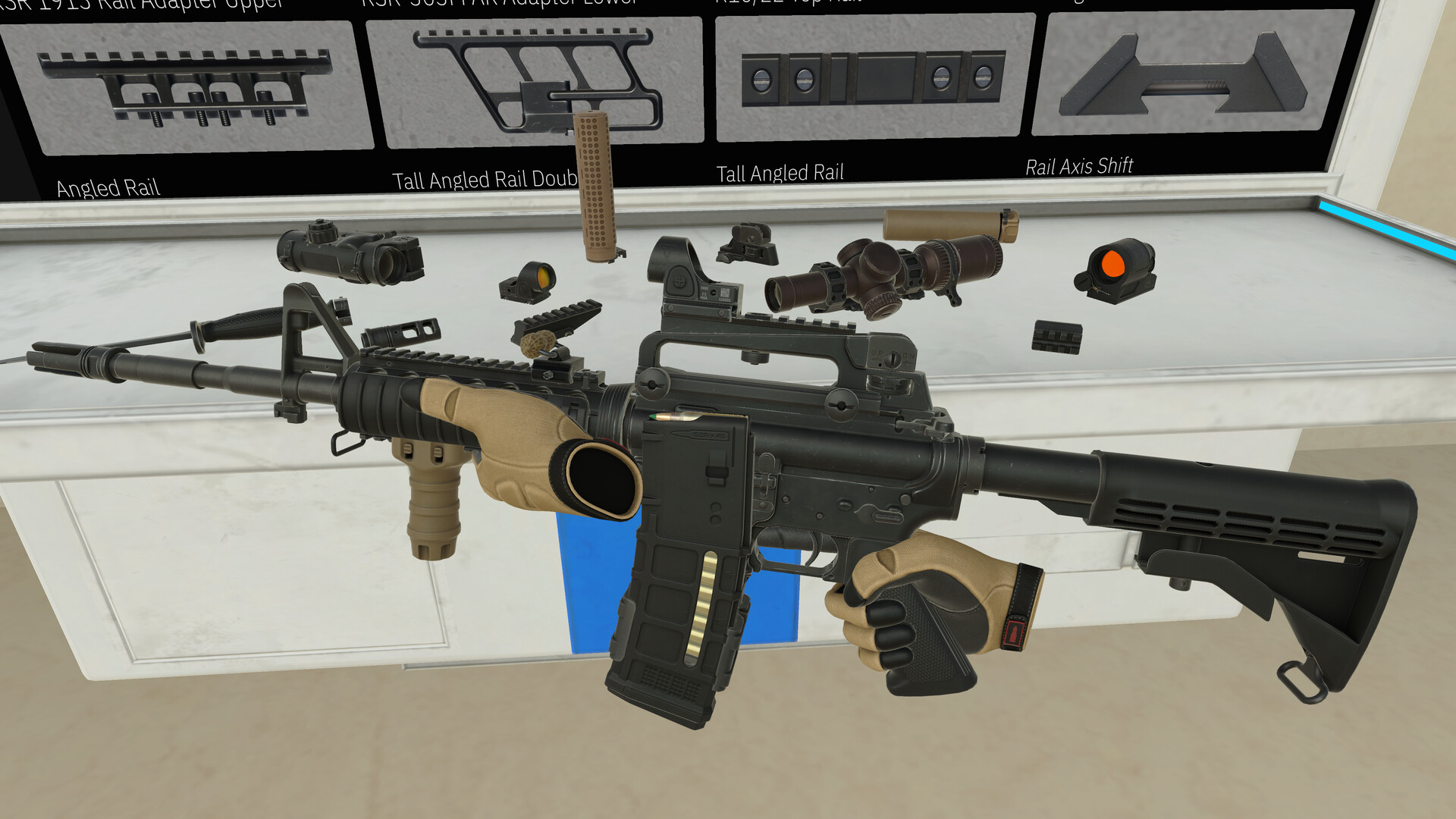
Official screenshot · Source: Steam store
The latest featurette shows that H3VR2 gun customization is evolving beyond simply placing objects on rails. Attachments now account for rail indexing, optic eye relief, muzzle thread compatibility, bore diameter, and even whether a suppressor is designed for low-pressure ammunition. The result should be a system where the choices you make affect handling and performance rather than just appearance.
The information below is based on the developer’s attachment feature presentation. Because the game’s systems may continue to change before and after launch, treat unreleased features as announced functionality rather than a final specification. For official updates, visit the H3VR2 Steam page and wishlist listing.
How the new attachment system works
The largest quality-of-life improvement is interaction. In the original game, grabbing a rifle with several accessories could sometimes select the wrong object. A decoration, laser, or foregrip might get in the way when you were trying to pick up the weapon itself.
The sequel’s system separates general grabbing from deliberate attachment selection. You can use the grab ray to point at a specific mounted object, then use a grip or trigger input to select it. This should make removing or adjusting accessories more predictable, especially during combat.
Rail slots and attachment placement
Attachments are indexed according to the slots on the rail. That matters because not every rail places its mounting positions in the same way.
| Rail or mounting style | What changes | Practical effect |
|---|---|---|
| 1913-style rail | Uses regular, standardized slots | Easier placement for common accessories |
| Older Weaver-style rail | Uses nonstandard slot spacing | Attachment positions may differ from modern rails |
| Dedicated firearm mount | Follows the weapon’s designed interface | Often limits placement to intended locations |
| Decorative rail cover | Occupies a rail position without adding a major function | Adds style while preserving a cleaner weapon profile |
This approach makes attachment placement more deliberate. Instead of sliding an accessory anywhere along an invisible track, players will need to work with the actual mounting positions provided by the weapon.
The unified object settings menu
The developer also described a universal settings menu that can be linked to configurable objects. Rather than learning a different menu for every accessory type, players can use one interface for settings such as:
- Numerical adjustments
- Colors and textures
- Object behaviors
- Optic settings
- Other configurable properties
The wrist menu can also be detached into the game world. This lets you use one hand to operate the menu while the other hand moves or selects equipment. For VR players, that small change could make loadout preparation considerably less awkward.
| Workflow | Older approach | New approach shown |
|---|---|---|
| Select an attachment | Physical grabbing could be imprecise | Aim the grab ray at the exact object |
| Change settings | Different accessories could use different menus | Use a unified configurable-object menu |
| Organize equipment | Menu interaction could occupy a hand | Detach the menu into the play space |
| Remove a rail accessory | Nearby objects might be selected accidentally | Deliberate ray selection improves precision |
Optics: irons, reflex sights, and scopes
Optics are a major part of H3VR2 gun customization, and the feature presentation emphasizes simulation rather than cosmetic representation. Each sight type appears to serve a different role, from simple iron sights to detailed magnified optics.
Iron sights
Iron sights remain straightforward: a front sight and rear sight work together to establish the weapon’s aiming reference. The sequel adds more detailed hand animations for manipulating sight components, which should make adjustments feel more physical.
For a practical iron-sight setup, prioritize visibility and simplicity. A crowded receiver can make it harder to align the front and rear sights, particularly when switching quickly between weapons.
Reflex sights
Reflex and holographic sights are designed around projected reticles. The reticle is not merely painted onto the lens; it is positioned in space and rendered for clarity across different display resolutions.
The developer says the reticles use accurate dimensions and a rendering technique intended to preserve crispness, even on lower-resolution VR headsets. That could be particularly helpful for players who struggle to see thin reticles or small aiming points.
| Optic type | Strength | Best use |
|---|---|---|
| Iron sight | Reliable and uncomplicated | Classic firearms and close-to-medium engagements |
| Reflex sight | Fast target acquisition | Dynamic encounters and general-purpose rifles |
| Holographic sight | Clear projected aiming reference | Players who prefer a larger reticle presentation |
| Fixed-power scope | Consistent magnification | Deliberate, medium- or long-range aiming |
| Antique scope | Distinctive historical handling | Immersive or themed weapon builds |
Scope behavior and eye relief
Scopes are where the sequel’s realism becomes especially significant. The system is described as data-driven, with optic-specific values for field of view, eye relief, reticle dimensions, and eye-box behavior.
Eye relief is the ideal distance between the player’s eye and the scope. If your eye is too close or too far away, the view through the optic can become restricted. In a real firearm, that can produce a small or distorted sight picture; in VR, it can make the scope uncomfortable or difficult to use.
The sequel’s dynamic shouldering system is designed to recognize the optic being used and move the weapon toward an appropriate viewing distance within a reasonable range. That should help with fixed-power and older scopes that require a very specific eye position.
The presentation also mentions first- and second-focal-plane reticles. In a first-focal-plane optic, the reticle changes apparent size with magnification. In a second-focal-plane optic, the reticle generally remains the same apparent size while the target image changes. Players who enjoy technical marksmanship simulations will likely notice the difference.
Bayonets and decorative accessories
Bayonets are another area where H3VR2 gun customization connects weapon setup with the melee system. The developer says bayonets now use the same underlying behavior as standalone melee weapons, rather than functioning as a limited add-on.
That distinction allows different bayonet designs to behave differently. A knife-style bayonet can support both thrusting and cutting motions, while a dedicated spike or older stabbing implement focuses primarily on penetration.
| Bayonet style | Main behavior | Suggested role |
|---|---|---|
| Knife-style bayonet | Thrusting plus cutting | Flexible close-quarters use |
| Spike bayonet | Primarily thrusting | Historical or specialized builds |
| Long bayonet | Extended reach | Aggressive melee configuration |
| Compact bayonet | Less reach, easier handling | Balanced rifle setup |
Decorative attachments also receive a functional improvement. Rail covers, charms, and other cosmetic objects can overlap areas that would traditionally interfere with grabbing. The attachment-selection system is intended to prioritize the primary interaction, while the grab ray lets you target the decoration specifically when needed.
That means you can build a visually distinctive weapon without making it impossible to handle. In practical terms, players should be able to add rail covers and charms without worrying that every decoration will become a nuisance during a firefight.
Muzzle devices require real compatibility
Muzzle devices appear to be the most technically involved part of H3VR2 gun customization. Instead of treating every muzzle accessory as universally compatible, the sequel tracks three important factors:
- Thread type
- Bore diameter
- Pressure rating
The game reportedly condenses real-world thread variation into five broad thread categories, while individual devices may support one or more configurations. This makes the rear portion of the muzzle device important, not just the visible model.
Bore diameter
Bore diameter determines whether the projectile can pass safely through the device. If the aperture is larger than necessary, performance may be reduced slightly. If the aperture is too small for the ammunition, the attachment can detach comically when the weapon fires.
That behavior creates an immediate in-game lesson: do not assume that an accessory fits simply because it can be mounted. Check the ammunition and device specifications before firing.
| Compatibility factor | If matched correctly | If mismatched |
|---|---|---|
| Thread type | Device mounts securely | Attachment may not fit or may be incompatible |
| Bore diameter | Projectile passes as intended | Oversized bore may reduce performance |
| Pressure rating | Device handles the ammunition | Low-pressure device may unwind or detach |
| Attachment style | Expected weapon behavior | Unstable or ineffective setup |
Flash hiders, brakes, and compensators
Flash hiders primarily change the appearance and intensity of the muzzle flash. They can be useful when building a historically appropriate or visually consistent firearm, but they are not described as major recoil-control devices.
Muzzle brakes and compensators redirect propellant gases to reduce felt recoil. The tradeoff is that they can increase visible flash and make the gunshot louder for the shooter. For a fast-firing rifle, that may improve control while making the weapon more punishing to use indoors or without hearing protection.
Suppressors
Suppressors receive several simulated effects:
- Reduced firing sound
- A small velocity increase
- Point-of-aim shift
- Increased dwell time
- Compatibility differences based on bore and pressure
Some suppressors attach by threading on, while others use a quick-detach system. A QD suppressor should be faster to mount, making it useful for players who change configurations frequently.
Low-pressure suppressors are a special case. A narrow .22 LR suppressor, for example, is not intended for standard 5.56 ammunition. Using the wrong cartridge can cause the suppressor to progressively unwind and fly off the barrel.
| Muzzle device | Primary benefit | Main tradeoff |
|---|---|---|
| Flash hider | Changes muzzle-flash signature | Limited direct performance benefit |
| Muzzle brake | Reduces felt recoil | More flash and louder report |
| Compensator | Helps control muzzle movement | May increase blast and noise |
| Thread-on suppressor | Quieter firing and added simulation depth | Slower installation |
| Quick-detach suppressor | Rapid mounting and removal | Requires compatible interface |
| Low-pressure suppressor | Designed for light cartridges | Unsafe in-game behavior with higher-pressure rounds |
Practical H3VR2 build tips
The best H3VR2 gun customization choices will depend on the weapon, ammunition, and scenario. A good-looking setup is not automatically a good-performing setup, so build around a clear purpose.
A simple setup process
Use this sequence when configuring a new weapon:
- Choose the role. Decide whether the weapon is for close quarters, general use, precision shooting, or historical immersion.
- Mount the primary optic. Start with iron sights, a reflex sight, or a scope before adding secondary accessories.
- Check the eye position. With magnified optics, confirm that the sight picture is clear and comfortable.
- Verify the muzzle interface. Match the thread category and bore size before selecting a suppressor or brake.
- Confirm ammunition compatibility. Pay particular attention to low-pressure devices.
- Add functional accessories. Only then consider bayonets, rail covers, charms, or other visual details.
- Test the weapon. Fire a few rounds and observe recoil, flash, sound, cycling, and point-of-aim changes.
Recommended builds
| Build goal | Suggested configuration | Why it works |
|---|---|---|
| Fast general-purpose rifle | Reflex sight, compatible flash hider, minimal decoration | Keeps aiming quick and the weapon uncluttered |
| Precision rifle | Fixed-power scope, careful eye relief, compatible suppressor | Prioritizes a stable sight picture and reduced sound |
| Historical rifle | Iron sights, period-appropriate bayonet, matching muzzle device | Preserves the weapon’s intended character |
| Close-quarters setup | Reflex sight, compensator or brake, compact bayonet | Supports rapid aiming and recoil management |
| Lightweight .22 build | Simple optic or irons, correctly rated .22 suppressor | Avoids overloading a small-caliber weapon |
A useful rule is to add accessories one at a time. After every major change, test the weapon again. This makes it easier to identify whether a muzzle device changed recoil, whether a scope’s eye box feels comfortable, or whether a decorative piece is interfering with an interaction.
The feature presentation does not yet cover every accessory category. Foregrips and lasers are still being developed, while under-barrel weapons are mentioned as possible post-release additions. As a result, the launch attachment lineup may expand over time.
FAQ
What is new about H3VR2 gun customization?
The sequel introduces more precise rail-slot placement, a grab-ray attachment-selection system, a unified configuration menu, advanced optic behavior, improved bayonets, and more detailed muzzle-device compatibility.
Can decorative accessories interfere with weapon handling?
They are designed not to interfere with primary interactions. You can target a specific decoration with the grab ray, while standard grabs should prioritize the weapon or its main interaction.
Are suppressors interchangeable between all weapons?
No. You need to consider thread type, bore diameter, and pressure rating. A suppressor with an incorrect bore or an unsuitable pressure rating may lose effectiveness or detach when fired.
Which optic should I choose first?
A reflex sight is the most versatile starting point for many players because it offers quick target acquisition without the eye-relief demands of a scope. Iron sights are ideal for simplicity, while scopes suit deliberate precision builds.
Will H3VR2 include every attachment at launch?
Not necessarily. The developer indicated that some systems, including certain foregrips, lasers, and under-barrel weapons, were still in development or planned for later additions. Check official updates for the final launch lineup.
Related Guides
H3VR2 all guns: Complete Weapons List and Guide
Explore the H3VR2 all guns list, including pistols, rifles, shotguns, SMGs, grenades, ammo types, and enemy-only Sosigguns.
H3VR2 attachments: Complete Gun Customization Guide
Learn how H3VR2 attachments work, including optics, bayonets, muzzle devices, rail placement, configuration menus, and practical loadout tips.
H3VR2 guns: Complete Weapons Guide and List
Explore the confirmed H3VR2 guns, weapon categories, realistic mechanics, ammo tips, and the best firearms to learn first in Facility mode.
H3VR2 early access: Quest Launch Guide and Review
Everything you need to know about H3VR2 early access, including Quest availability, Facility mode, gunplay, pricing, tips, and PC VR plans.
H3VR2 quest: Complete Standalone Review and Guide
Our H3VR2 Quest review covers the Facility campaign, weapons, performance, extraction mechanics, price, and tips for new players.