H3VR2 discord: Find Players, Tips, and Updates
Find the right H3VR2 Discord community for squadmates, extraction tips, technical help, and reliable game updates.
Why the H3VR2 Discord Community Matters
The right H3VR2 discord community can turn a confusing extraction run into a successful gear haul, especially when you are still learning the game’s weapons, alarms, and loot systems. Searching for an H3VR2 discord is also useful for finding technical help, controller fixes, gameplay partners, and news that may not appear in a regular search.
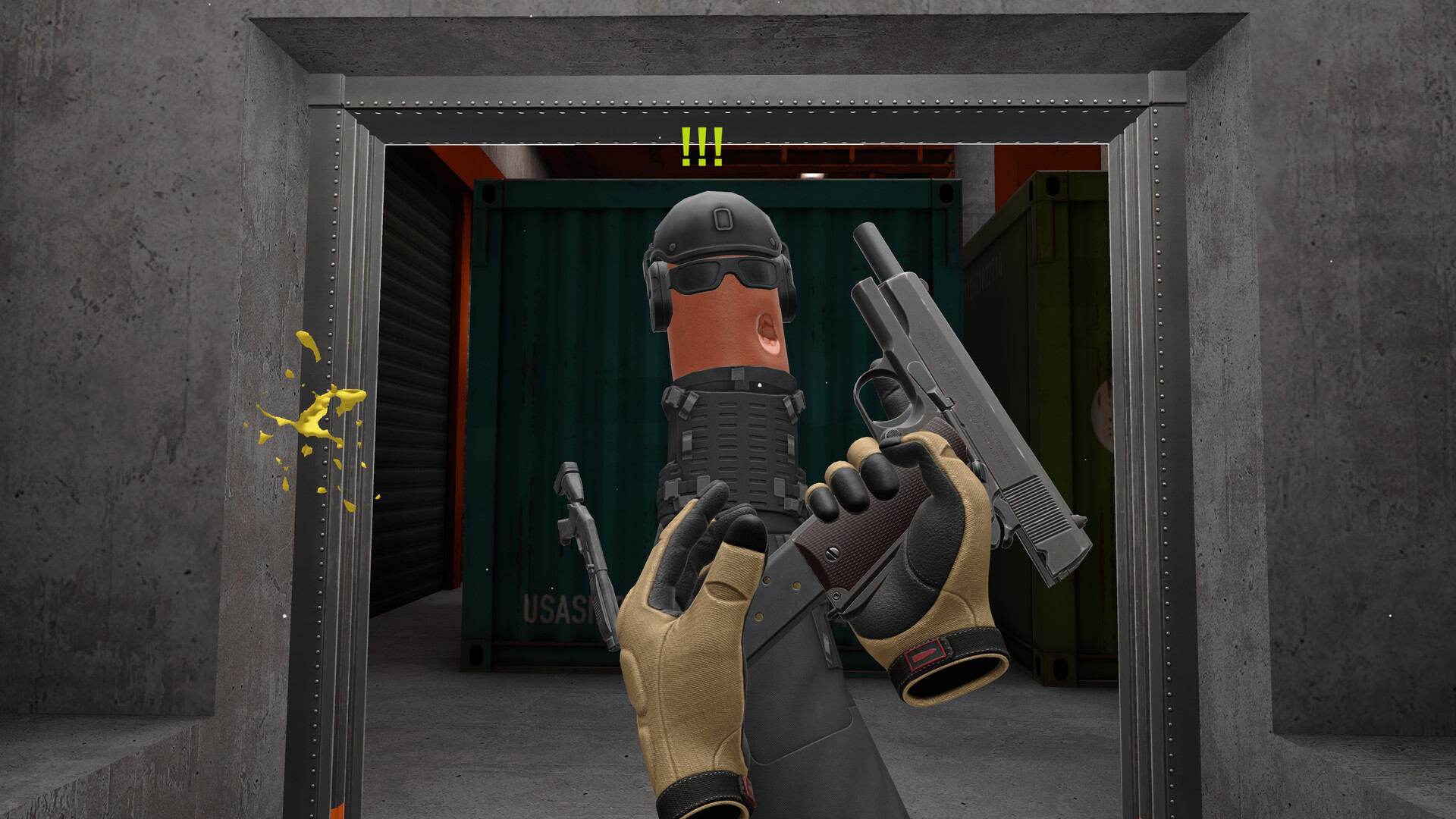
Official screenshot · Source: Steam store
Hot Dogs, Horseshoes & Hand Grenades 2 expands the original VR shooter with a procedurally generated facility, more detailed firearms, new enemies, and a deploy-loot-extract progression loop. The official H3VR2 press kit from RUST LTD describes the game as a VR experience centered on shooting, looting, extraction, range training, and building an armory over multiple runs.
Because the game is new and its systems are still being learned, community discussion is especially valuable. Players can compare extraction routes, identify useful ammunition, explain certification challenges, and report bugs before formal guides are widely available.
Where to Find H3VR2 Discord Discussions
There may be several communities using H3VR2-related names, but they do not all serve the same purpose. Some are general VR servers, some focus on hardware or PC streaming, and others are fan communities for the original game and its sequel.
The reference material includes a community report pointing to a Panda Discord thread for Venture-related questions. That appears to be a support discussion connected to running the Quest version on PC through Venture, rather than proof of an official H3VR2 server. Treat it as a player resource and verify every invite before joining.
| Community type | Best for | What to check first |
|---|---|---|
| Official developer community | Announcements, verified patches, development news | Look for links from the developer’s website or verified social accounts |
| H3VR2 fan server | Builds, gameplay advice, screenshots, player discussion | Read the rules and confirm whether spoilers are separated |
| General VR Discord | Headset setup, tracking, performance, PC streaming | Check whether H3VR2 has a dedicated channel |
| Hardware-focused server | Venture, headset, controller, and graphics troubleshooting | Avoid downloading unofficial files shared by unknown users |
| LFG community | Finding players and organizing sessions | Confirm time zones, age requirements, and voice-chat rules |
How to Verify a Server
Before joining any H3VR2 Discord community, use these checks:
- Start with an official source. Look for a server link on the developer’s website, verified social profile, or an in-game announcement.
- Check the server’s age and activity. A healthy community usually has recent messages, clear moderation, and organized channels.
- Read the rules. Rules should explain spoilers, harassment, promotions, self-advertising, and voice-chat behavior.
- Do not trust urgency. Messages claiming that you must “verify” through an unfamiliar download or login page are common warning signs.
- Confirm technical advice. Compare installation instructions with official documentation before changing system files or account settings.
Never share your Meta password, Steam credentials, recovery codes, or payment information in a Discord direct message. A legitimate community moderator should not need them.
What Players Are Discussing
Community reports suggest that H3VR2 conversations currently center on four areas: extraction strategy, weapon and ammunition management, shooting-range challenges, and PC access.
The official game description emphasizes “deploy, fight, loot, extract,” so it is natural that new players use Discord to compare routes and learn how the facility works. Unlike a conventional arena shooter, a failed run can involve more than poor aim. Players must also choose equipment, recognize ammunition types, manage alarms, and decide what is worth carrying out.
| Topic | Typical player question | Useful information to share |
|---|---|---|
| Extraction mode | “What can I bring into the next run?” | Item type, carry method, and whether it survives extraction |
| Ammunition | “Why do I have bullets but no compatible weapon?” | Caliber, weapon model, magazine type, and available alternatives |
| Facility stealth | “Can I avoid fighting every enemy?” | Alarm behavior, line of sight, noise, and safe movement |
| Shooting range | “Why did I hit every target but earn no award?” | Time, accuracy, challenge name, and any missed condition |
| Controller tracking | “Why are objects sticking to my hand?” | Headset, controller model, tracking conditions, and game settings |
| PC performance | “How do I reduce stutters?” | Headset resolution, refresh rate, GPU, runtime, and connection method |
Extraction Tips From Community Reports
The following suggestions are based on player experience rather than confirmed developer documentation. Use them as starting points and test them in your own runs.
- Carry an item you specifically want to preserve before beginning a mission.
- Sort ammunition by caliber instead of assuming every pistol or rifle uses the same rounds.
- Do not spend starting ammunition unnecessarily if stealth is possible.
- Watch enemy behavior before firing. Some encounters may be avoidable if you do not trigger alarms or attack in view of neutral characters.
- Recycle unwanted equipment when possible, but remember to withdraw the resulting materials before leaving.
- Keep one reliable weapon and compatible ammunition rather than collecting every firearm you see.
- Record the item, level, and extraction point when reporting a problem.
One community report described losing recycled materials by failing to withdraw them before moving on. Whether the interface changes in future updates or not, this is a useful reminder: treat extraction stations as a two-step process. Deposit or recycle first, then confirm that the resulting item is in your inventory before leaving.
| Run phase | Recommended action | Common mistake |
|---|---|---|
| Loadout | Select a weapon with ammunition you understand | Taking several incompatible calibers |
| Deployment | Identify exits and nearby cover | Entering combat without an escape plan |
| Exploration | Search methodically and listen for threats | Triggering alarms while rushing |
| Inventory management | Keep useful ammunition and tools | Filling slots with low-value items |
| Extraction | Confirm valuable items are secured | Assuming nearby loot is automatically saved |
| Between runs | Review what worked and adjust | Repeating the same loadout without learning |
Getting Better Help on H3VR2 Discord
A vague question such as “Why is my game broken?” usually receives fewer useful answers than a short, structured report. Discord communities work best when members provide enough information for others to reproduce the issue.
Use the following template when asking for help:
| Information to include | Example |
|---|---|
| Platform | Quest headset, PC VR, or PC streaming setup |
| Headset and controllers | Quest 3 with Touch controllers, Index, or another device |
| Game version | Version number shown in the game or store |
| Problem | “Recycled materials disappeared after extraction” |
| Steps taken | “Deposited items, recycled them, left without withdrawing” |
| Expected result | “Materials should remain available at base” |
| Actual result | “Materials were missing after the next run” |
| Evidence | Screenshot, short video, or exact error message |
For performance problems, add your GPU, CPU, RAM, headset resolution, refresh rate, VR runtime, and connection type. A report that includes “90 Hz, 3,500-by-3,500 per eye, wireless PC VR” is far more actionable than simply saying “it is laggy.”
PC and Venture Discussions
A player video reports using Venture to run the Quest version of H3VR2 on a PC. The video describes Venture as a translation layer rather than a conventional emulator and reports high resolution and smooth performance on the creator’s hardware. Those results are individual player experience, not a guarantee for every system.
If you are discussing Venture in an H3VR2 Discord, separate confirmed facts from personal results. For example:
- Confirmed by your setup: headset model, resolution, frame rate, and whether the game launched.
- Community report: another player achieved a particular frame rate or used a Steam shortcut.
- Unverified claim: speculation about account bans, legal status, or future compatibility.
- Safe recommendation: use legally purchased software and follow the current tool documentation.
| Before asking about PC performance | Why it matters |
|---|---|
| Check that the game is installed from a legitimate store | Reduces account and security risks |
| Record your headset and GPU | Helps others estimate performance |
| Test a lower resolution first | Separates hardware limits from configuration problems |
| Check controller tracking and lighting | Prevents misdiagnosing tracking issues as game bugs |
| Avoid unofficial executables | Reduces malware and account theft risks |
| Read recent support messages | The solution may already be documented |
Do not assume that another player’s settings will work for you. High-resolution VR can increase GPU load dramatically, and wireless streaming introduces network variables that do not affect a wired setup.
How to Build a Useful H3VR2 Community
The best H3VR2 Discord channels are not simply places to post invite links. They become useful when members organize information so that new players can find answers without reading hundreds of messages.
A practical server layout might include:
#announcementsfor verified news and patch information#new-player-helpfor basic controls and onboarding#extraction-tipsfor routes, loot, and inventory questions#weapons-and-ammofor caliber and handling discussions#range-challengesfor certification and score advice#technical-supportfor headsets, controllers, and PC performance#lfgfor finding players#clips-and-screenshotsfor gameplay media#spoilersfor discoveries that should not appear in general chat
| Moderation practice | Benefit |
|---|---|
| Pin frequently used guides | New members find answers quickly |
| Label community reports | Readers know what is confirmed and what is anecdotal |
| Separate spoilers | Protects players who are still exploring |
| Require context in bug reports | Makes troubleshooting faster |
| Remove suspicious download links | Protects members from malware |
| Keep criticism specific | Encourages useful feedback instead of arguments |
When sharing information, identify its source. Use labels such as official information, player experience, community report, or unconfirmed theory. This simple habit prevents rumors from becoming accepted as facts.
You can also contribute without being an expert. A clear screenshot of an ammunition box, a recorded error message, or a short description of how an extraction failed may help other players identify a pattern.
H3VR2 Discord FAQ
Is there an official H3VR2 Discord?
The available reference material does not verify a specific official H3VR2 Discord invite. Look for community links through RUST LTD’s official channels rather than relying on random search results. Fan servers and general VR communities may still provide excellent help, but they should be identified as unofficial.
What should I ask in an H3VR2 Discord?
Ask focused questions about extraction, ammunition, range challenges, controller tracking, or PC performance. Include your platform, headset, game version, steps that caused the issue, and a screenshot or video when possible. This gives players enough context to provide a useful answer.
Can Discord help with H3VR2 PC performance?
Yes. Community members can compare headset settings, resolution, refresh rate, GPU hardware, tracking conditions, and wired or wireless connections. However, performance claims are player experience and may not apply to your system. Follow current official or tool-specific documentation before installing software.
Is the Panda Discord an official H3VR2 server?
The provided player video refers to a Venture thread on the Panda Discord for questions about running Quest games on PC. That makes it a relevant community resource for Venture discussions, but the reference does not establish it as an official H3VR2 server. Verify ownership, rules, and download links before participating.
Related Guides
H3VR2 reddit: Where to Find Real Community Updates
Find reliable H3VR2 Reddit updates, wishlist news, discussion tips, and ways to verify community claims before sharing them.
H3VR2 website: Features, Platforms, and Updates
Explore the H3VR2 website for confirmed features, platforms, gameplay details, development updates, and practical wishlist tips.
H3VR2 roadmap: Updates, PC VR, and What’s Next
Explore the H3VR2 roadmap, including Quest 3 launch details, Facility updates, PC VR timing, mod support, and what players can expect next.
H3VR2 quest 3: Release, Gameplay, Price, and Tips
Discover H3VR2 on Quest 3, including price, modes, performance, weapons, campaign tips, and whether you should buy it now.
H3VR2 coop: What Multiplayer Players Need to Know
Wondering about H3VR2 coop? Here is what is confirmed, what remains unknown, and how the extraction mode could shape future multiplayer.